You are viewing an Archived item in your Knowledge Base, it is not publicly accessible.

Contact Us

If you still have questions or prefer to get help directly from an agent, please submit a ticket.
We’ll get back to you as soon as possible.

  • Submit a Ticket
  • Home

Accounting Suite Web Hooks

Contact Us

If you still have questions or prefer to get help directly from an agent, please submit a request.
We’ll get back to you as soon as possible.

Please fill out the contact form below and we will reply as soon as possible.

  • Integrations
    QuickBooks Online QuickBooks Desktop Theramanager Xero
  • Invoices
    Invoice Delivery Best Practices
  • Features
    Automatic Batch Reconciliation Customer Portal Dashboard Frequently Asked Questions Getting Started Import Tools Invoice Generator Invoice Messenger Late Fees Mobile Check Capture Paper Mail Payment Plans RDC (Remote Deposit Capture) Reminders Technology Fees
  • Payments
    ACH Check Processing Credit Card Processing Deposits Schedules & Recurring Billing Stored Cards Transactions PayPal
  • Reports
    Customer Email Reminders Sync History Feature Utilization
  • Settings
    Billing Branding General Settings User Accounts
  • Customers
+ More

Table of Contents

Step 1 - Locate your Accounting Suite Admin Settings Step 2 - Find Webhooks

This article explains how to configure your Accounting Suite settings so that all your information is continuously updated in Biller Genie.

Step 1

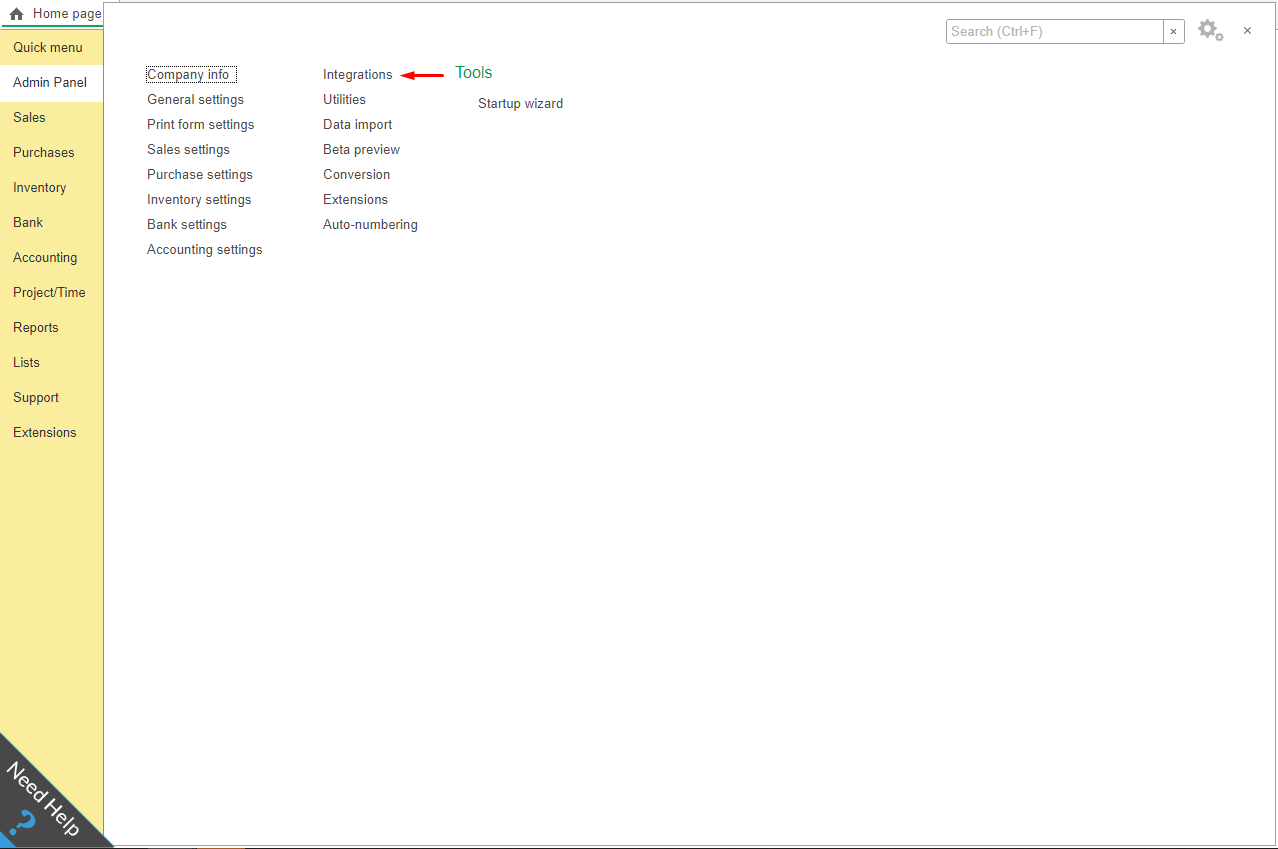
On the Accounting Suite Dashboard navigate to the Admin Panel and select Integrations.
Step 2

Select Webhooks and populate all input lines with the Biller Genie Webhooks endpoint URL: https://merchant.billergenie.com/AccountingSuitePush.
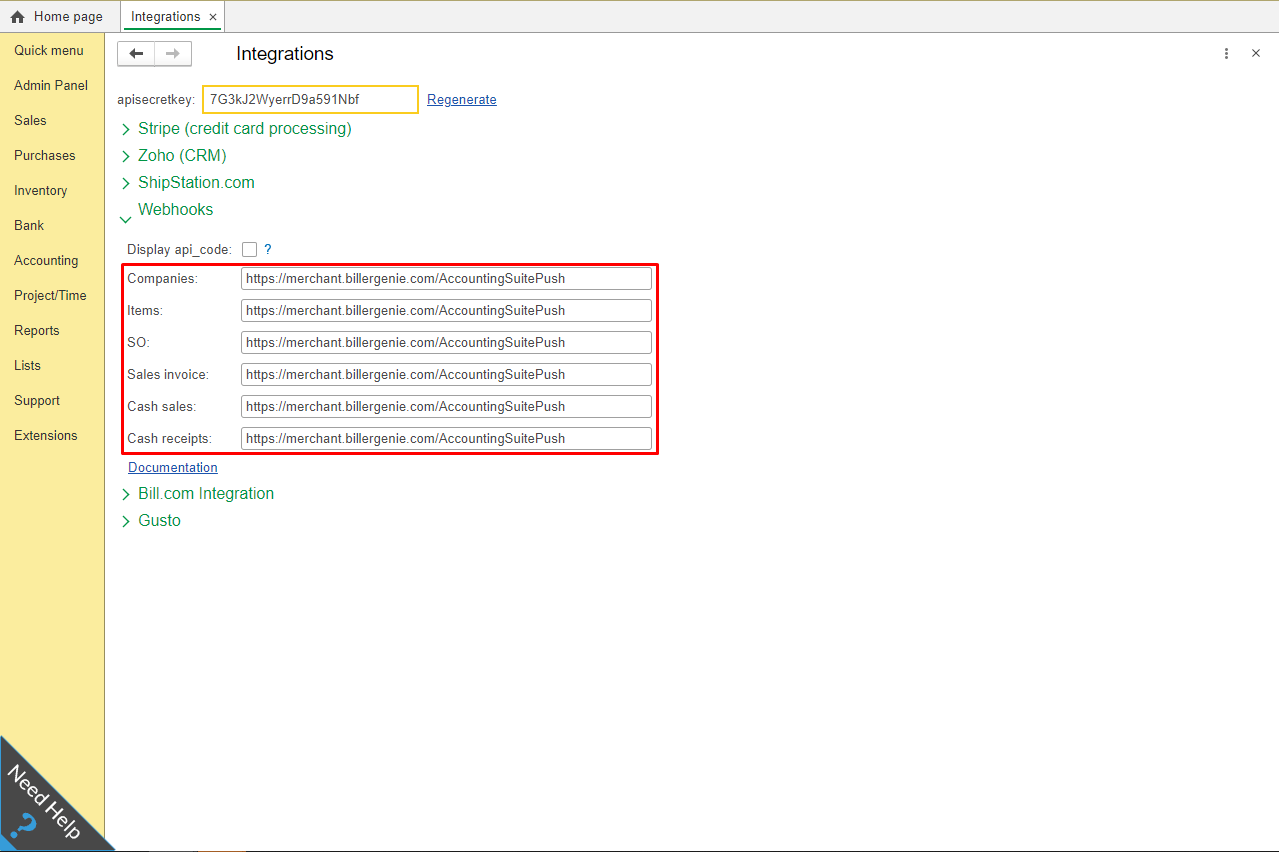
Any changes created in Accounting Suite will trigger a call, and the Customer/Invoice will be updated accordingly.

webhooks accounting

Was this article helpful?

Yes
No
Give feedback about this article

Related Articles

  • Using QuickBooks Estimates to Delay Invoice Sending
  • Virtual Terminal
  • Customer & Invoice Import Playbook
  • BCC Yourself on Invoice Emails
  • View Invoice Timeline
logo

Headquarters

3550 Biscyane Bivd
Suite 704
Miami, FL 33137

Software

  • Features
  • Integrations

Learning

  • Help Center
  • FAQ
  • Blog
  • Schedule a Demo

About Us

  • Contact Us
  • Our Story
  • Team
  • News
  • Careers

My Account

  • Login
  • Register
  • Submit a Ticket

Partners

  • Accountants/Bookkeepers
  • Financial Institutions
  • Franchises
  • Payment Providers
© Biller Genie. All Rights Reserved. Merchant License | Terms of Use | Privacy Policy
"Xero" and "Beautiful business" are trademarks of Xero Limited. | Intuit, QuickBooks, TurboTax, Proconnect and Mint are registered trademarks of Intuit Inc. | AccountingSuite is a registered trademark of YellowLabs Software, LLC. I All other trademarks, service marks and other registered marks are the property of their respective owners.
Expand