
Check Processing in Biller Genie lets you turn paper checks into electronic deposits without going to the bank. Checks are imaged (with a mobile camera or a desktop check scanner), submitted electronically to the banking network, and applied as payments against your customers' invoices — or recorded as standalone transactions. This article explains how the feature works conceptually, what it takes to enable it on your account, and what to expect on funding timeframes and paper-check retention.
Capturing and processing are two separate steps
The most important thing to understand about Check Processing in Biller Genie is that capturing a check and processing the payment are two asynchronous steps. They can be done by the same person at the same time, or by different people at different times — Biller Genie doesn't care.
- Capture means producing a digital image of the check — front and back — and submitting it to Biller Genie. You can capture with a phone or tablet camera (Mobile Check Capture), with a desktop browser that uploads a saved image file, or with a dedicated MagTek check scanner connected to a computer (Remote Deposit Capture, or RDC).
- Process means matching that captured check to a specific invoice (or recording it as a standalone transaction not tied to an invoice) and submitting the payment to the banking network.
In practice, that means you can have one staff member at the front desk scan every check that comes in, and a different person in accounting match each scanned check to the right invoice later. Or you can do both yourself in a single sitting. Captured-but-unprocessed checks sit in the Add-On view until you process them.
For the capture mechanics, see Capturing Checks: Mobile or MagTek Reader. For the matching/processing step, see Processing a Check: Matching, Standalone, and Sync.
How traditional check deposits work
Without electronic check processing, paper checks have to be physically transported to a bank branch (or stuffed in an ATM envelope), where they enter the clearing process. The check has to move physically before the funds clear — which means deposits stack up between bank visits and you lose visibility on when funds will actually be available.
How electronic check processing works
With RDC or Mobile Check Capture, your business never has to leave the office. A check image (front and back) replaces the physical check. Biller Genie's processing partner, ReliaFund, submits the imaged check through the banking network in the same way a traditional ACH transaction is submitted. The funds are deposited after standard banking settlement timelines.
Each captured check produces an electronic record that includes:
- The front and back image of the check
- The routing number and account number (read from the MICR line)
- The check amount you entered during capture
Setting up Check Processing on your account
Check Processing is a Biller Genie Add-On. Enabling it is a one-time setup that includes applying for a ReliaFund account (the processor that handles the electronic check submission).
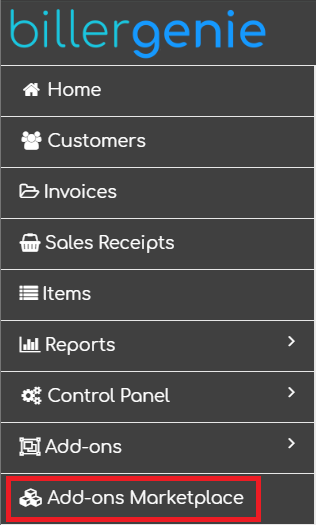
Step 1. Log in to your Biller Genie account and navigate to the Add-Ons Marketplace.
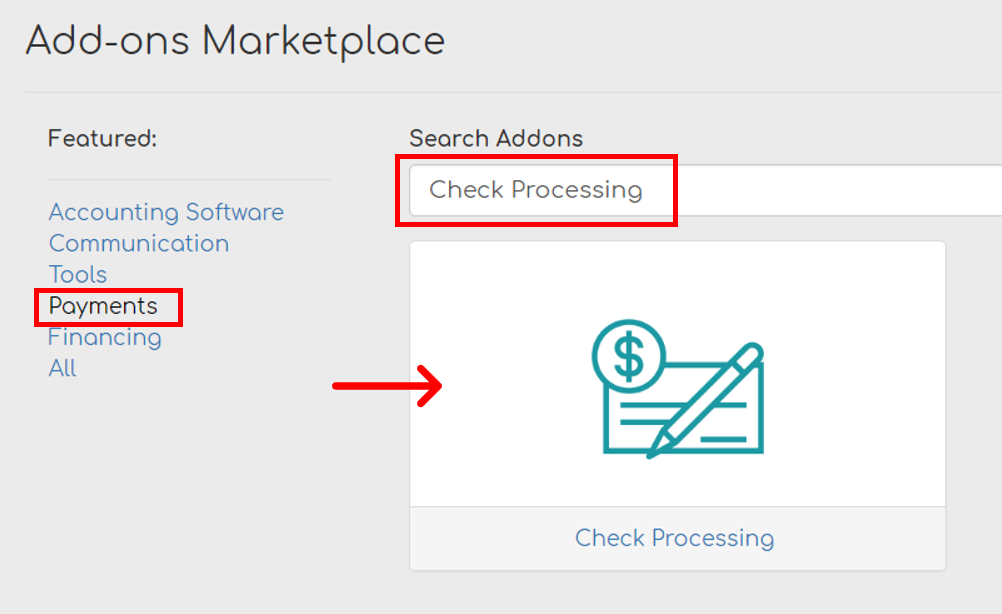
Step 2. Select the Payments category or search for "Check Processing." Click the Check Processing tile.
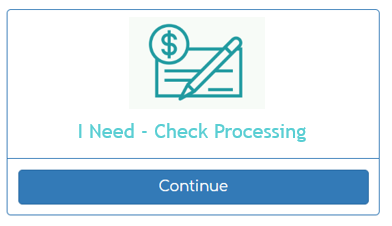
Step 3. Click Continue under I Need Check Processing.
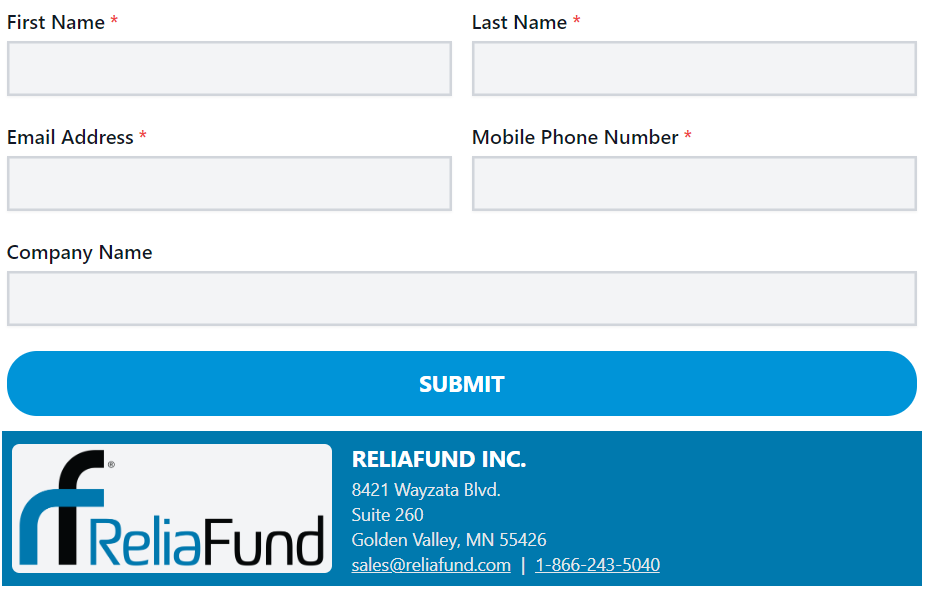
Step 4. Complete the application form and click Submit. You'll receive an email with a link to finalize your application.
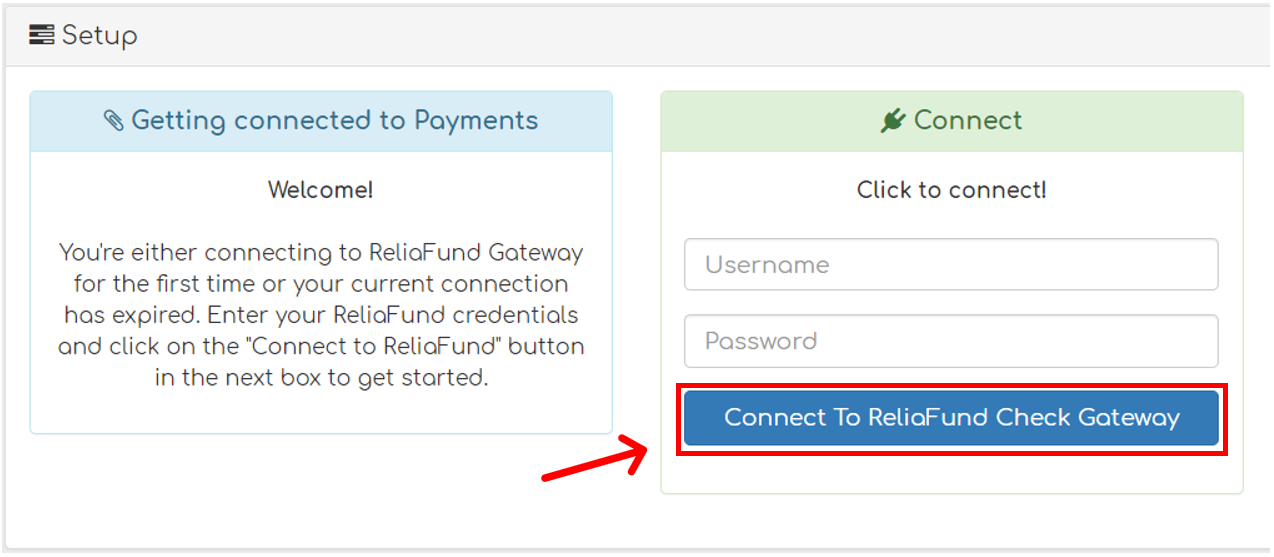
Step 5. Once your application is approved, ReliaFund will send you a second email with your login credentials. Biller Genie is notified once your credentials are created. In most cases, our team will automatically connect the credentials on your behalf — if you return to Add-Ons > Check Processing and see that the account is already connected, you're done.
If credentials aren't yet connected, enter your ReliaFund credentials and click Connect To ReliaFund Check Gateway.
Step 6. Pick a capture method. To actually start scanning checks, you need either the Mobile Check Capture Add-On (phone, tablet, or desktop browser upload) or the Remote Deposit Capture Add-On (MagTek scanner). See Capturing Checks: Mobile or MagTek Reader for the comparison and install steps.
Processing timeframes
Electronic check processing follows standard banking settlement timelines. Most check transactions are funded within 3–5 business days, depending on your merchant service provider and bank policies. While a check is in the settlement window, it appears on the Pending Transactions Report — and Biller Genie suppresses reminders and late fees on the associated invoice during that period.
If a processed check rejects after submission (returned by the customer's bank), Biller Genie reopens the invoice and surfaces the rejection on the Rejected Transactions Report.
Storing and destroying paper checks after imaging
Once a check has been imaged and submitted for deposit, the original paper check is no longer the active payment record. Most banks and processors still expect you to retain the physical check for a short period in case the image needs to be researched, then destroy it securely. Three things matter: storage, retention period, and destruction.
Storing the paper checks
Keep imaged paper checks in a secure area with limited employee traffic and no customer traffic. Limit access to people who actually need it. A locked drawer or filing cabinet in a back-office area is usually sufficient.
Retention period
Industry guidance is to retain the original paper checks for at least 20 and no more than 90 calendar days after they have been posted to your account. The exact retention window inside that range is up to your business, but it should be long enough to research image-quality issues or pull the original if needed.
Destroying paper checks after retention
Once the retention period has passed, destroy the original checks securely and beyond recovery. A cross-cut or diamond-cut shredder is the standard. Do not leave deposited paper checks loose on a desk and do not put them in regular trash or recycling.
Still having trouble?
If you have questions about Check Processing or need help applying for or connecting your ReliaFund account, contact support@billergenie.com with:
- Whether you've applied for ReliaFund yet
- Whether you've received your ReliaFund credentials
- Which capture method you plan to use (Mobile or RDC)
- Any error messages displayed